Netflix Party is now called Teleparty.
How to host a Netflix party with free video chat
The old extension is still around under the new name. If you just want a Netflix watch party where everyone stays on the same scene and can see each other, Watchbear is a free browser extension for Chrome that does that.
- Free video and voice chat
- Up to 50 people a room
- Chrome on a computer
Netflix watch party in three steps
Everyone needs Chrome on a laptop or desktop, a Google account to sign in, and their own Netflix account. Netflix catalogs differ by country, so check the title is there for everyone first.
-
Add Watchbear and start a party
Install Watchbear from the Chrome Web Store, pin the bear to your toolbar and sign in with Google. Open the film or episode on Netflix, click the bear, and choose Start a party with this video.
The room opens in Chrome's side panel next to the player, so nothing covers the picture.
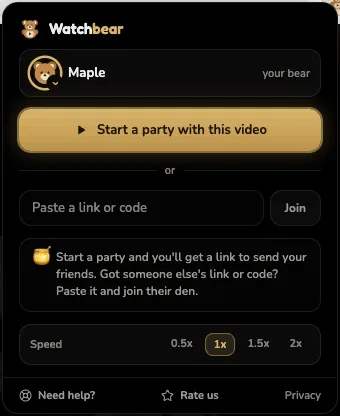
The Watchbear popup on a video page. -
Send the invite link
Copy the invite link from the panel and send it in your group chat, or read out the short room code. A friend who opens the link without Watchbear sees an install button first, then lands on the same title.
Each friend signs in to their own Netflix. Only the position in the film travels between you.
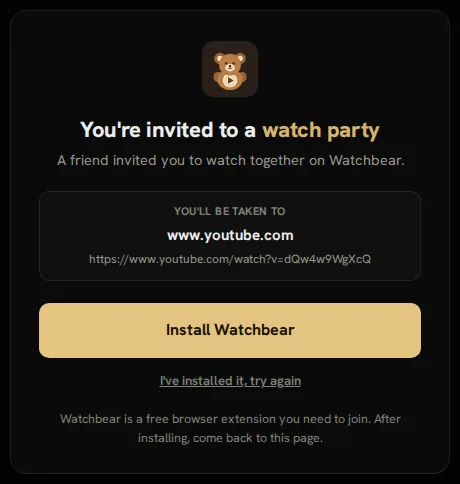
What a friend sees when they open your invite link. -
Press play and talk
Anyone in the room can play, pause or skip, and every player follows. Turn on your microphone or camera from the panel to talk over the film. Cameras start off each time you join.
Chat and emoji reactions sit in the same panel, beside the video.
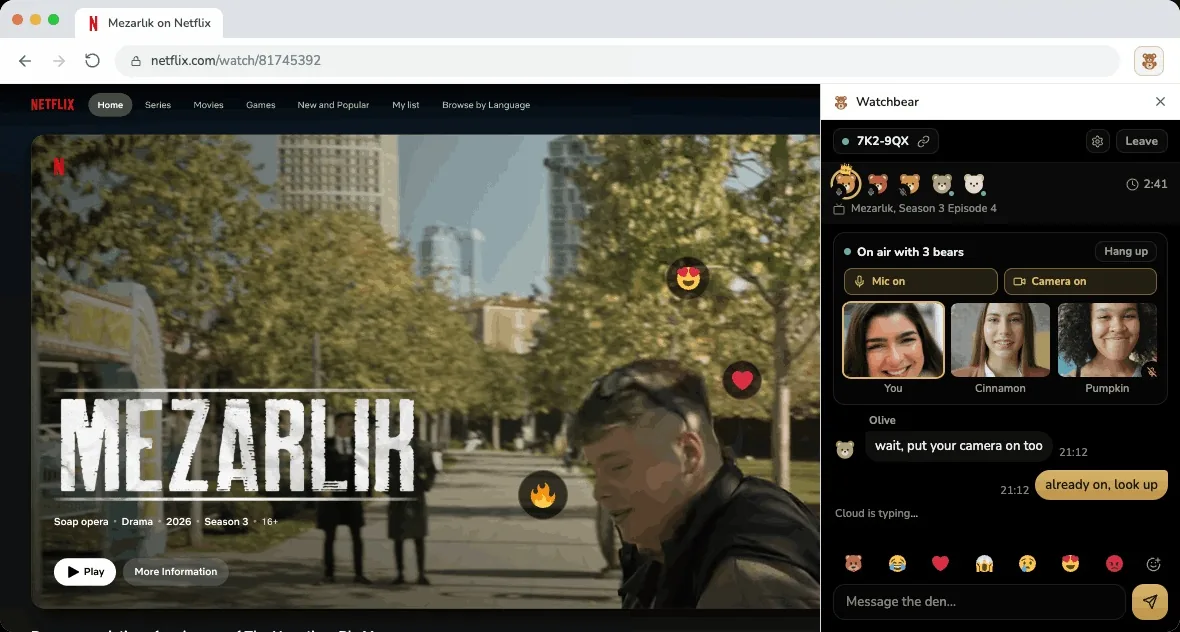
A Watchbear room on Netflix, with three people on camera.
Watchbear vs Teleparty for Netflix
Both keep everyone's Netflix player in sync and give each person full picture quality, because nobody shares a screen. The differences are in calls, price and devices.
| Feature | Watchbear | Teleparty |
|---|---|---|
| Price | Free to use | Free plan. Premium is $6.59 a month, or $3.99 a month billed yearly ($47.88) |
| Voice and video chat | Free for everyone, up to 8 people at once | Only Premium users can turn on a camera or microphone; everyone can see and hear them |
| Text chat | Chat and emoji reactions in a side panel | Chat sidebar |
| Sites | Netflix with dedicated handling, plus YouTube, Vimeo and most sites with a standard video player | A named list: Netflix, Disney+, Hulu, Prime Video, YouTube and HBO Max free; Crunchyroll, Paramount+ and ESPN+ with Premium |
| Party size | Up to 50 people | Up to 1,000 people |
| Browsers | Chrome | Chrome, Edge, Safari and Opera |
| Phones | No, it needs a computer | iOS and Android apps for Netflix, Disney+, Hulu and HBO Max |
| Sign-in | Google account for everyone | Google account needed for Premium |
Teleparty details from teleparty.com/support, checked November 28, 2026. The full Watchbear vs Teleparty comparison covers where Teleparty is the better pick.
Why not just share your screen?
On Discord, Zoom or Meet, Netflix often shows up as a black rectangle because of its copy protection, and when it does come through, the call compresses it for everyone. With a sync extension each person plays their own copy at full quality. More on that in why streaming Netflix on Discord goes black, and the longer guide to watching Netflix together online.
For long distance movie nights, see how to watch movies together long distance.
Netflix watch party questions
Is Netflix Party still available?
Not under that name. The old extension is now Teleparty, and its website describes it as Teleparty (formerly Netflix Party). Watchbear is a separate extension that does the same core job: it keeps everyone's Netflix player on the same second.
Can I join a Netflix watch party from my phone?
Not with Watchbear. It runs in Chrome on a laptop or desktop computer only. Teleparty has iOS and Android apps that support Netflix, Disney+, Hulu and HBO Max, according to its support page.
Does everyone need their own Netflix account?
Yes. Watchbear only shares the playback position and play or pause, never the video. Each person streams the title from a Netflix account they can use, so everyone needs access to it.
Is a Netflix watch party with Watchbear free?
Yes. Watchbear is currently free to use, including voice and video chat, and nothing asks for a card. Everyone signs in with a Google account. The Netflix subscription is the only cost, and each person pays for their own.
Does it work on Hulu, Prime Video or Disney+?
Netflix is the only subscription service with dedicated handling in Watchbear. On Hulu, Prime Video or Disney+, Watchbear looks for the main video on the page as it does on any site, and copy-protected players behave differently from site to site. Try it with one friend before a big night.
How many people can join?
Up to 50 people in a Watchbear room, and up to 8 of them on camera and microphone at once.
Start your Netflix party
Add the free extension, open a title on Netflix, send the link and start watching. Everyone stays on the same scene.
Add to Chrome, freeNetflix and Teleparty are trademarks of their respective owners. Watchbear is not affiliated with or endorsed by Netflix or Teleparty.